
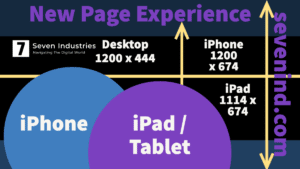
As many of you have seen in recent months, Facebook has implemented a “New Page Experience” which changes the way your personal or business profile appears on different devices. To simplify things, I’ve made a graphic / template you can download and use to help you create the best background image possible. What you’ll find out is that logos work best inside of your circular photo/icon area and background images that are more scenic, graphical or with human elements work the best. Cramming text in is possible, but it just comes off as cluttered. Use your page for text and links to get people to visit your personal site. Remember, social channels are distribution channels that you don’t own – so try to get clients and customers to visit your world / website.
Click here to download the template.
“What’s new for Pages?
-
A redesigned Page layout that’s cleaner and more intuitive
-
Easy switching and navigation between a public-facing Page and an individual profile. Manage your Page and profile separately.
-
Seamless interactions with other public figures, brands and people via access to Feed: Follow other public figures, brands, and partners to create a Feed with topics that matter to you. Stay up to date and connect with people and content on your new Page Feed.
-
Your new Page Feed will be separate from your profile. You can follow different Pages and profiles to curate a unique experience for your Feed on the new Page. Anyone with full control will see this Feed.
-
-
Actionable insights and more relevant notifications
-
Updated Page Management tools: You can give others Facebook access or task access to manage the Page.
What features will I have access to with a new Page?
Anyone who was previously an admin on the Page will retain Facebook access after transitioning to the new Page experience. If you have Facebook access of a new Page, you will have access to the following:
-
Settings: Manage and edit all settings, such as Page info and deleting the Page.
-
Permissions: If you have Facebook access with full control, you can give Facebook access or task access to your new Page to help manage it.
-
Content: Create, manage or delete any content on the Page, such as posts, Stories and more.
-
Messages: Respond to direct messages as the Page in Inbox.
-
Community activity: Remove and respond to comments, remove unwanted comments and report activity on the Page.
-
Ads: Create, manage and delete ads on all platforms.
-
Insights: Use Page, post and ad insights to analyze the performance of the Page.
-
Instagram account linking: Link your new Page with your Instagram account to manage communication, cross-post and run ads across both platforms.
-
Monetization & advertising: Use tools to help monetize content you create. Create and manage ad campaigns using your new Page and Ads Manager.
Will I lose access to features or tools from my classic Page?
-
Page likes and followers: You’ll retain existing likes and followers on your new Page.
-
Like or follow counts will be displayed beneath the Page name on your new Page, depending on the action button. For example, creators with a “Like” action button will have their like count visible, with their follow count accessible in the professional dashboard. Those with a “Follow” action button will have their follow count displayed beneath the Page name. Learn more about likes and follows.
-
-
Classic Page roles, such as moderator and editors, will not be available at this time
-
You can give Facebook access or task access to your new Page to help manage it
-
-
Publishing tools, such as scheduled posts
-
You can schedule posts from Meta Business Suite or Creator Studio.
-
-
Business features, such as jobs, appointments, offers and Facebook Page Shop
-
Manage from mobile web browsers: You can manage the new Page from the Facebook mobile app, but not from mobile web browsers.
-
Locations management (http://business.facebook.com/business_locations) is not available for pages that are transitioned to the New Pages Experience.
-
Global pages structure isn’t available yet for pages that are transitioned to the New Pages Experience.” via Facebook
If you have any questions or are ready to begin, we’re here and ready to help you on your digital journey. Need help? Drop a line to hello@sevenind.com